Service: Command-Line Interface (CLI)
| Field | Value |
|---|---|
| Title | Service: Command-Line Interface (CLI) |
| Type | design |
| Status | draft |
| Version | 0.1.0 |
| Component | service-cli |
| Date | 2026-04-07 |
IMPORTANT — Implementation-blind document: This document describes behavior, structure, and responsibilities WITHOUT referencing code. No code blocks using programming languages (C++, C, Python, CMake, shell, etc.) are allowed. Use Mermaid diagrams to express behavior instead. Prose descriptions of algorithms are encouraged; source-level details are not.
Diagrams: All visuals must be either a Mermaid fenced code block (
```mermaid) or ASCII art inline in the document. External image references using Markdown image syntax are not allowed.
Responsibilities
Is responsible for: - Providing a human-readable
serial command-line interface for commissioning, diagnostics, and
runtime control of the motor - Parsing user-typed command strings into
typed arguments (numeric values, enums) using
TerminalHelper, and returning structured
StatusWithMessage responses on success or failure - Routing
commands to the appropriate control mode interface
(FocTorque, FocSpeed,
FocPosition) based on which interactor is active -
Delegating motor lifecycle and calibration to the
FocStateMachine when lifecycle commands such as
calibrate, enable, disable,
clear_fault, and clear_cal are issued -
Printing a welcome banner with version information and available
commands when the terminal first connects - Ensuring all string handling
uses bounded-size containers — no heap allocation at any point
Is NOT responsible for: - Physical serial framing,
character echo, or byte-level UART management — those are handled by the
TerminalWithStorage infrastructure component - Choosing
which control mode is active — the active interactor is configured at
construction by the application - Executing identification or alignment
procedures itself — commands are forwarded to the relevant service;
results are printed asynchronously when the service callback fires
Component Details
Command Registration
Every command is registered by the control-mode coordinator, which
owns the only lifetime-safe reference to the active control mode. There
is no per-mode interactor object in production: the active mode lives
inside a std::variant that is replaced on a mode switch, so
an object holding a reference to it could outlive its target. The
coordinator instead dispatches each command to whichever mode is active
and rejects the command when it does not apply.

Lifecycle Commands
| Command | Alias | Arguments | Action |
|---|---|---|---|
calibrate |
cal |
— | Runs the calibration sequence |
enable |
en |
— | Enables the motor; rejected outside Ready |
disable |
dis |
— | Disables the motor |
clear_fault |
cf |
— | Clears a latched fault |
clear_cal |
cc |
— | Invalidates stored calibration |
active_mode |
am |
— | Prints the active control mode |
apply_estimates |
ae |
— | Applies the online estimates to the loop gains |
estimate_status |
es |
— | Prints the current online estimates |
Algorithm Selection
| Command | Alias | Arguments | Action |
|---|---|---|---|
select_current_algorithm |
sca |
pid | decoupled | deadbeat | sliding | Selects the current-loop law; rejected while enabled or before the motor model is identified |
select_speed_algorithm |
ssa |
pid | lqi | adrc | twodof | Selects the speed-loop law; speed and position modes only |
select_position_algorithm |
spa |
pid | cascadep | lqr | lqi | twodof | Selects the position-loop law; position mode only. LQR and LQI are refused when their Riccati design fails |
active_algorithms |
aa |
— | Prints the active current, speed and position laws |
Setpoints
Each setpoint command applies to exactly one control mode and is rejected with a mode-mismatch message in the others, and rejected when the lifecycle state does not accept setpoints.
| Command | Alias | Arguments | Accepted range | Mode |
|---|---|---|---|---|
set_torque |
st |
Iq (A) | ±100 | Torque |
set_speed |
ss |
omega (rad/s) | ±1000 | Speed |
set_position |
sp |
theta (rad) | ±2π | Position |
Ranges come from foc::CommandLimits. The CAN path checks
speed and position against the same limits, but checks torque against
the inverter’s MaxCurrentSupported(). Either way the torque
cascade scales every setpoint onto the
MaxCurrentSupported() envelope, so neither path can command
more current than the inverter supports. A value outside the range
checked at entry is rejected and never reaches the control law.
The torque command takes the q-axis current only. The d-axis reference is held at zero by the control law, so exposing it would let an operator command a flux reference the cascade immediately overwrites.
Bandwidths
| Command | Alias | Arguments | Accepted range | Availability |
|---|---|---|---|---|
set_current_bandwidth |
scbw |
bandwidth (rad/s) | 1 … 20000 | All modes |
set_speed_bandwidth |
ssbw |
bandwidth (rad/s) | 1 … 2000 | Speed and position modes |
set_position_bandwidth |
spbw |
bandwidth (rad/s) | 1 … 500 | Position mode |
Retuning is refused while the motor is enabled, and refused when the active law cannot be redesigned for the requested bandwidth. Bandwidths are bounded below at 1 rad/s: a zero or negative bandwidth produces zero or sign-inverted gains, which inverts the sense of the loop’s feedback on a motor that may be spinning.
Both bounds and the enabled-state policy are enforced inside
ControlModeStateMachine::TrySet*Bandwidth rather than in
the command handlers, so the CLI and the CAN bridge cannot drift apart.
The ranges come from foc::CommandLimits; the predicates
that apply them live in
core/foc/math/ParameterValidation.hpp. A rejected value is
reported before any controller is touched, so a refused retune leaves
the previously accepted bandwidth live.
The same per-loop predicates gate bandwidths arriving from persisted
calibration: CurrentTuningsFor and
OuterLoopStateMachine::ApplyMechanics fall back to the
compiled default unless the stored value is within the loop’s range, so
a record written by an older firmware cannot install an out-of-range or
non-finite gain.
Diagnostics Commands
Three commands expose what the control loop and the CAN bus have been doing. Each of these numbers was previously either computed and discarded or never gathered at all.
| Command | Alias | Reports |
|---|---|---|
loop_stats |
ls |
Control-interrupt execution: sample count, budget, last/min/average/max cycles, overruns, deadline misses, re-entries |
can_stats |
cs |
CAN error counters, total and per class, printing only the classes that have occurred |
clear_stats |
xs |
Resets both sets of counters |
Overrun versus deadline miss. The two are distinct and both are reported. An overrun means the interrupt exceeded the share of the period it is budgeted — the margin is gone, but the deadline was still met. A deadline miss means it exceeded the period itself: the next conversion was already due when it finished.
Re-entry is the same failure caught as it happens rather than measured afterwards. A conversion arriving while the previous interrupt has not returned is recorded directly, which no measured duration can reveal.
Counters saturate rather than wrap, so a long run cannot present itself as a healthy one.
TerminalWithBanner —
Decorator
TerminalWithBanner wraps any
TerminalWithStorage instance and intercepts the first
connection event. On first connect, it prints a formatted welcome
message containing:
- Firmware version string
- Board/hardware identifier
- A list of available commands (derived from the registered interactor)
After the banner is printed, all subsequent inputs and outputs pass
through to the underlying TerminalWithStorage unchanged.
The banner is printed at most once per connection — reconnecting the
serial terminal causes the banner to be printed again.
TerminalHelper —
Argument Parsing
TerminalHelper is a stateless utility that is invoked by
each command handler to convert bounded-string tokens extracted from the
command line into typed values. It handles:
- Floating-point numbers — parsed from a
bounded-string token; out-of-range or malformed input produces a
StatusWithMessagewith a human-readable description and a non-ok status so that the interactor can return the error directly to the caller without further processing. - Enumerations — matched case-insensitively against a compile-time list of valid string representations; unknown values produce an error with the list of valid options in the message.
- Integer values — parsed with range checking against a caller-supplied minimum and maximum.
TerminalHelper operates entirely on
infra::BoundedString tokens — no dynamic string allocation
occurs.
Lifecycle Commands via
FocStateMachine
The FocStateMachine registers additional commands on the
same TerminalWithStorage instance that enforce the motor
lifecycle state machine. These commands are always available regardless
of which control mode is active:
| Command | Alias | Action |
|---|---|---|
calibrate |
cal |
Runs the full calibration sequence (pole pairs → R/L → alignment → mechanical ident for speed modes) |
enable |
en |
Enables the FOC controller (only allowed from Ready
state) |
disable |
dis |
Disables the FOC controller and returns to Ready |
clear_fault |
cf |
Clears the active fault and returns to Ready (if
calibration data is held) or Idle |
clear_cal |
cc |
Invalidates NVM calibration data and returns to
Idle |
Response Model —
StatusWithMessage
Every command handler returns a StatusWithMessage, which
is a pair:
- Status — an enumeration value (
ok,badArgument,notAllowed,hardwareError, …) - Message — an
infra::BoundedStringcontaining a human-readable description of the outcome
The terminal writes the message to the serial output verbatim. For
asynchronous commands (alignment, identification, NVM), the immediate
return to the terminal is {ok, "Operation started"} and the
final result is written by the service’s completion callback.
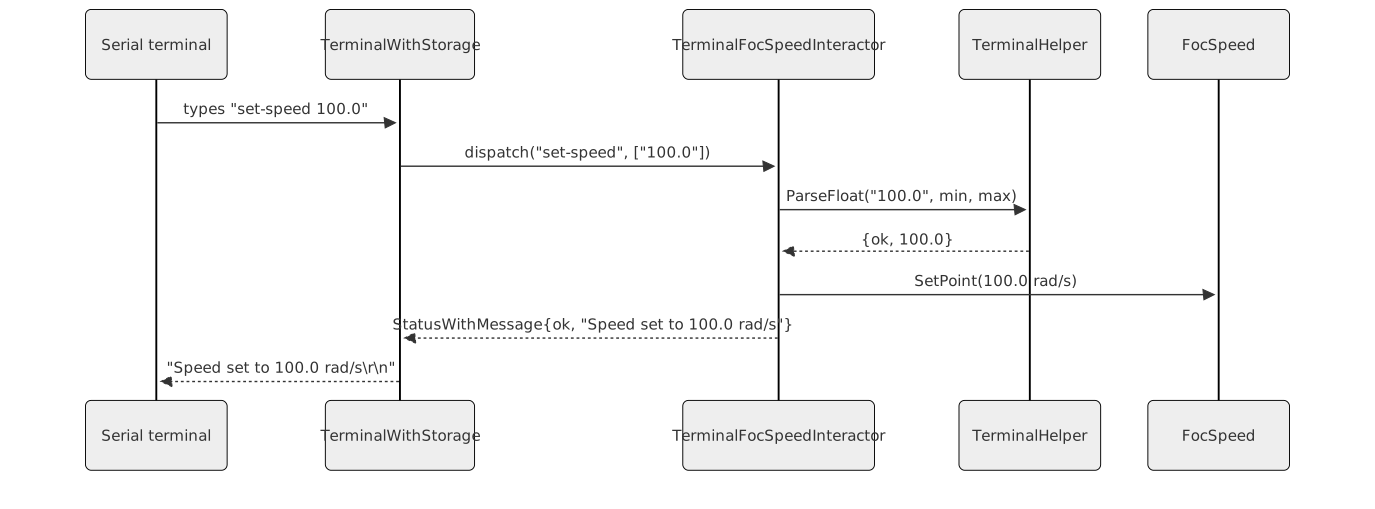
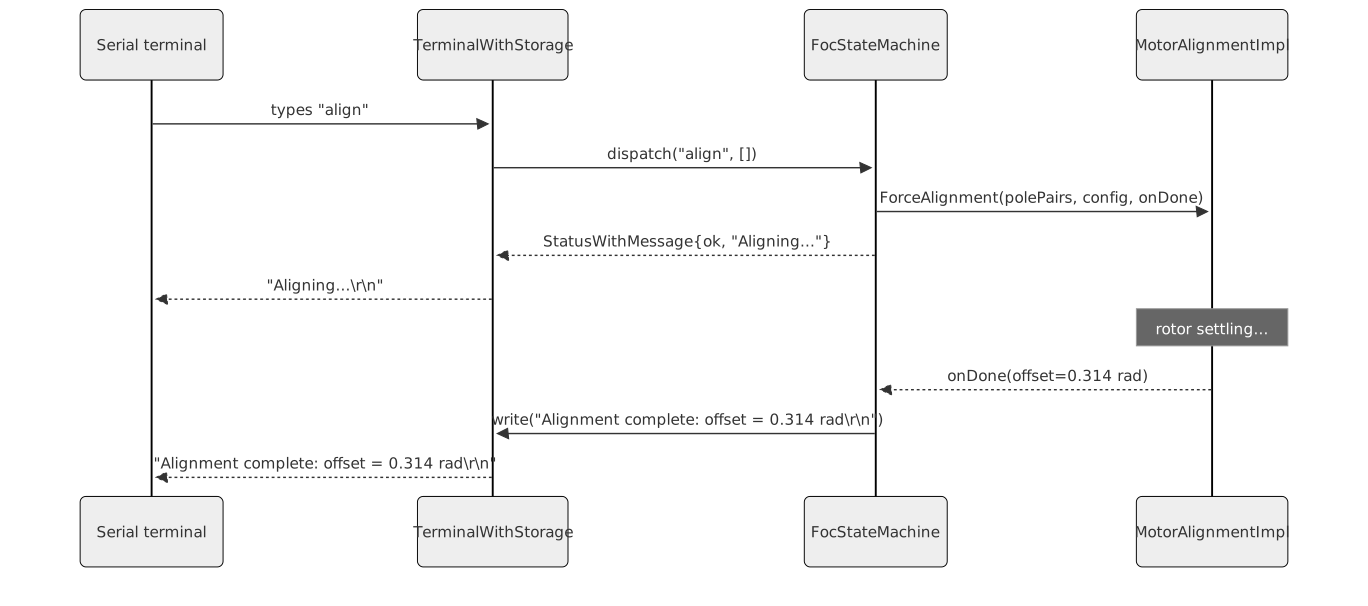
Asynchronous Command Flow
For commands that trigger asynchronous services, the interactor
initiates the service and returns {ok, "Operation started"}
immediately. The service’s onDone callback captures a
reference to the TerminalWithStorage and writes the final
result:
Memory Constraints
All string handling within the CLI layer uses
infra::BoundedString with compile-time fixed capacities.
Command names, argument tokens, and response messages are all bounded.
The maximum response message length is enforced statically.
Registered command handlers are stored in a fixed-size look-up
structure in the TerminalWithStorage infrastructure — no
dynamic registration table is used.
Interfaces
Provided
| Interface | Purpose | Contract |
|---|---|---|
TerminalFocBaseInteractor (and subclasses) |
Registers the set_current_bandwidth command on
TerminalWithStorage; exposes a Terminal()
accessor for the FocStateMachine to register lifecycle
commands on the same terminal |
Constructed once per application; exactly one interactor subclass is active at a time |
TerminalWithBanner |
Decorates TerminalWithStorage to print a welcome banner
on first connection |
Transparent to the underlying terminal after the banner has been printed |
Required
| Interface | Purpose | Contract |
|---|---|---|
TerminalWithStorage |
Receives and dispatches parsed command tokens; writes string responses to the serial output | Must be connected to the physical serial driver before any interactor is constructed |
CurrentLoopTunable |
Provides SetCurrentTunings(), shared by all control
modes |
Must remain valid for the lifetime of the interactor |
FocTorque / FocSpeed /
FocPosition |
Provides mode-specific setpoint and tuning methods | The concrete interface must match the constructed interactor subclass |
DC bus voltage (Volts) |
Supplied to the interactor for normalising PID gain inputs before forwarding them to the FOC component | Must reflect the actual DC bus voltage at the time tunings are applied |
Hardware-Test EEPROM Commands
The hardware-test application registers three additional terminal
commands that exercise the EEPROM hardware directly through the
hal::Eeprom interface. These commands are available only in
the hardware-test build target and are intended for commissioning,
production testing, and EEPROM verification.
Command Reference
| Command | Alias | Arguments | Action |
|---|---|---|---|
eeprom_write |
ew |
<addr> <b0> [b1 … b63] |
Writes up to 64 bytes to the EEPROM starting at the given byte address. The callback fires when the hardware write completes. |
eeprom_read |
er |
<addr> <size> |
Reads size bytes (1–64) from the EEPROM starting at
addr and traces each byte value to the serial output. The
callback fires when the hardware read completes. |
eeprom_erase |
ee |
none | Erases the entire EEPROM to the all-0xFF state. The callback fires when the hardware erase completes. |
Asynchronous Completion
All three commands are asynchronous. The terminal prompt
(>) does not appear until the hardware operation
completes and ProcessResult is called from the completion
callback. This correctly models the interrupt-driven behaviour of the
TM4C EEPROM peripheral.
Argument Constraints
addr: unsigned integer in the range 0 to 65535b0 … b63: unsigned integer byte values in the range 0 to 255size: unsigned integer in the range 1 to 64
Invalid argument count or out-of-range values return an error
StatusWithMessage immediately without starting the EEPROM
operation.